 Socialphotos
How to add an Instagram feed to Shopify (3 ways)
Updated · By the Socialphotos team
An Instagram feed shows your latest Instagram posts on your Shopify store and keeps updating as you post. Shopify's free themes, such as Dawn, don't include one, so you add it with an app or with Instagram's own embed code.
In short: for a feed that updates by itself, install an Instagram feed app and add its block in the theme editor. For one or two posts, paste Instagram's embed code into a Custom Liquid section. Either way, you need an Instagram Business or Creator account for a live feed.
We build Socialphotos, a customer photo gallery app for Shopify that includes an Instagram feed. The steps below use it as the example, but most Instagram feed apps work the same way.
Before you start: check your Instagram account
Since Instagram retired its Basic Display API in December 2024, apps can only show feeds from professional accounts.
- Switch to a Business or Creator account. In Instagram's settings, open Account type and tools → Switch to professional account. It's free, and your followers see no difference.
- Link a Facebook Page if your app asks for one. Many apps connect through Facebook, which needs the Page. In Instagram: Edit profile → Page.
Personal accounts can still use embed code for single posts (method 3).
Method 1: an app block in the theme editor (recommended)
This works on Online Store 2.0 themes, which include current themes from the Shopify Theme Store.
- Install an Instagram feed app from the Shopify App Store and connect your Instagram account in the app.
- In Shopify admin, go to Online Store → Themes → Customize.
- Open the page you want the feed on, usually the home page.
- Click Add section, open Apps, and choose the app's feed block. In Socialphotos it's called Instagram Post Gallery.
- Drag it where you want it, often just above the footer, and click Save.
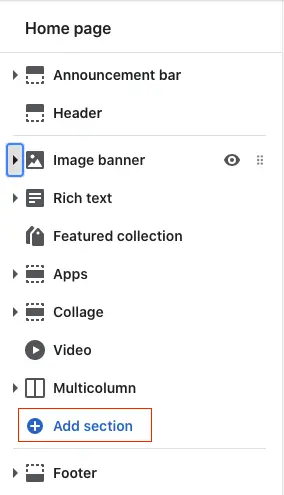
New posts then appear on your store without you doing anything. Check the live store, not only the theme editor preview.
Method 2: a snippet for older themes
Vintage themes (from before 2021) have no Apps option in the theme editor. Feed apps give you a short piece of code instead.
- Copy the code from the app's installation guide.
- Go to Online Store → Themes → … → Edit code and open the template, such as
index.liquidfor the home page. - Paste the code where the feed should appear and click Save.
If you're not sure which kind of theme you have, look for Apps under Add section in the theme editor. If it's there, use method 1. Theme installation guide.
Method 3: embed single posts without an app
For a launch or a single campaign post, Instagram's embed code is enough.
- Open the post on instagram.com, click … and choose Embed. The post must be public.
- Copy the code.
- In the theme editor, click Add section → Custom Liquid and paste it.
The trade-off: each embed is one post that never updates, shows Instagram's own frame, and can't link to your products.
Make the feed work harder
- Use a carousel near the top of the page. A compact row gets looked at more than a long grid at the bottom. In our study of 103 stores, the stores whose photos were viewed most were more than twice as likely to use a carousel. Ecommerce UGC best practices.
- Hide posts that don't fit. Promos and giveaways age badly. Most apps, Socialphotos included, let you hide a post from the feed without deleting it on Instagram.
- Link posts to products. A shopper who likes a post should reach the product in one tap. Check whether your app supports product tags and on which plan.
- Add posts you're tagged in. Your own posts show your brand. Customers' posts show real people using your products, which is what shoppers trust most. Show posts you are tagged in.
Showing several Instagram accounts
Stores that sell several brands, or run an account per country, often want a feed per account. Check that your app supports more than one connected account before you install it.
In Socialphotos, every Instagram account your Facebook login manages is connected at once. Add an Instagram Post Gallery block for each feed and type the account's username in the block's Instagram username setting.
Showing Instagram Stories
Stories disappear from Instagram after 24 hours, so a live feed can't show them for long. Apps that save your Stories as they're posted let you keep the best ones and add them to a gallery on your store. In Socialphotos, they're under Instagram → Stories.
If your Instagram feed stopped updating
- The connection expired. Instagram ends app connections after a few months. Reconnect the account in your app's settings. Socialphotos emails you before it happens.
- The account changed type. If it was switched back to a personal account, or unlinked from its Facebook Page, apps lose access. Switch back and reconnect.
- A theme change removed it. Blocks belong to a theme, so a new or updated theme starts without them. Add the block again (method 1).
- Some Reels are missing. Instagram may block apps from Reels that use copyrighted music.
Frequently asked questions
Can I add an Instagram feed to Shopify for free?
You can embed single posts for free with Instagram's embed code. A feed that updates by itself needs an app; many have a free plan or trial. Socialphotos includes the Instagram feed on every plan, with Reels and videos on Premium.
Why doesn't my Shopify theme have an Instagram section anymore?
Some themes used to include one, built on Instagram's Basic Display API. Instagram retired that API in December 2024, so those sections stopped working. An app block replaces them.
Will an Instagram feed slow down my store?
A feed app loads its script and images after your page. Keep the feed to a row or two, place it below your main content, and check your store's speed report in Shopify after adding it.
Is an Instagram feed the same as a customer photo gallery?
No. A feed shows your own posts automatically. A customer photo gallery shows photos you choose from customers, Instagram and uploads, often tagged to products. Many stores use both. Instagram feed vs customer gallery.
Add your feed in five minutes
Switch your Instagram to a professional account, install a feed app, and add its block to your home page in the theme editor.